
The school operating system for K–12
The whole school day, in one calm place.
Students and admissions, staff, the timetable, daily registers, staff cover and families — one record of the school, with a workspace for every role in it.
- Runs in the browser — nothing to install
- Nursery to Class 12
- Set up for your board
Set up for your board · Nursery to Class 12





- State boards
- Custom frameworks
Why OneSkool
A school runs on a thousand small confirmations. Who is in today. Who is covering period three. Whether 6-B’s register was taken, and whether a parent knows. Most of it still lives in registers, spreadsheets and group chats. OneSkool keeps it in one record, so the office, the staffroom and every family work from the same page.
For every role
A workspace for every role.
One record of the school, five workspaces. The principal, coordinators, teachers, parents and students each sign in to what they need — and nothing they don’t.
Principal, office and coordinators
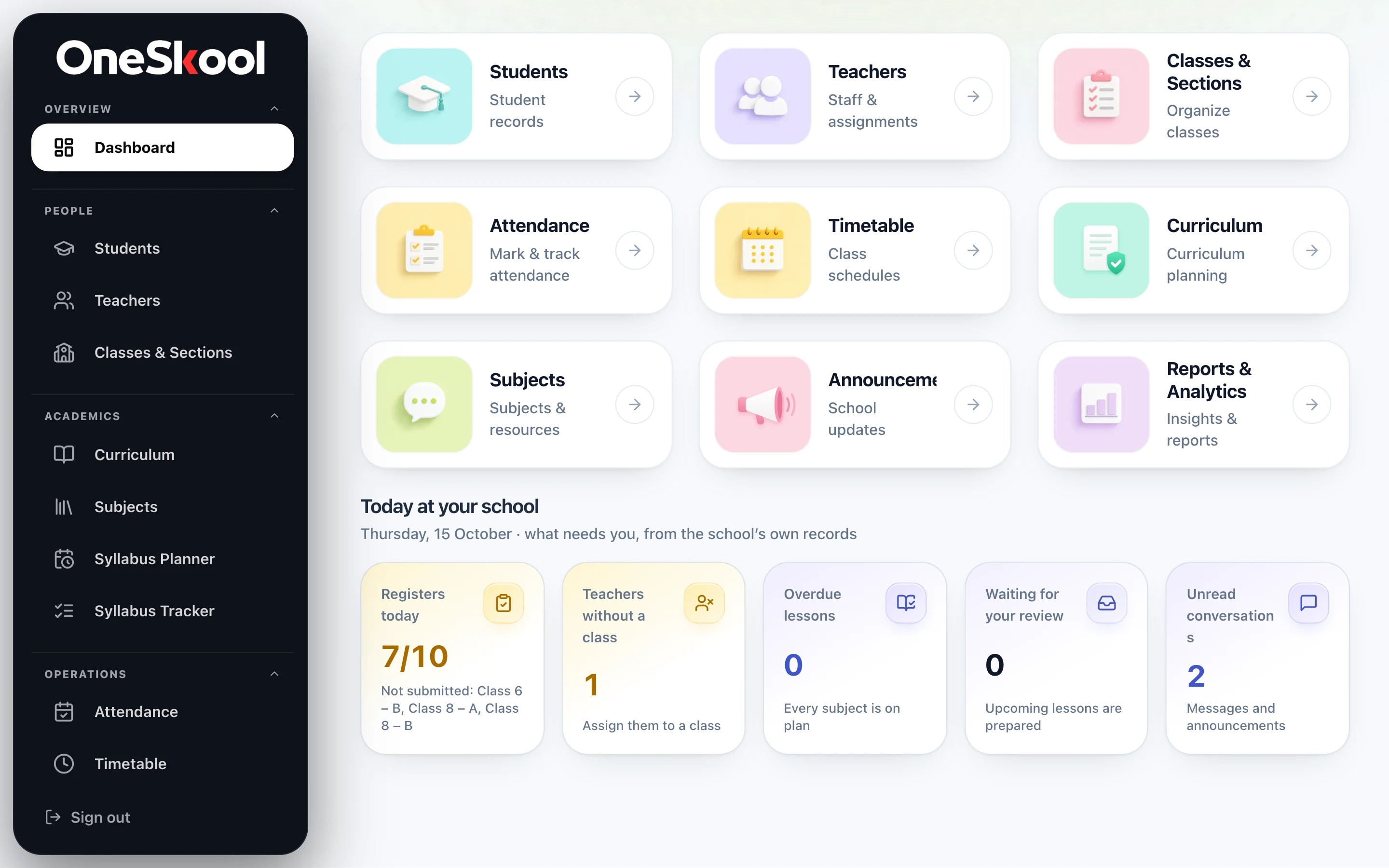
The whole school, as it stands this morning.
- Which sections have taken today’s register, and which haven’t
- Teachers without a class, lessons running late, messages waiting
- Students, staff, timetable and calendar one click away
Product tour
From setup to the daily register.
What a school runs on every day, built around how Indian schools already work: boards, sections, class teachers, Saturday timetables and guardians’ consent.
01Guided setup
Set the school up the way it runs.
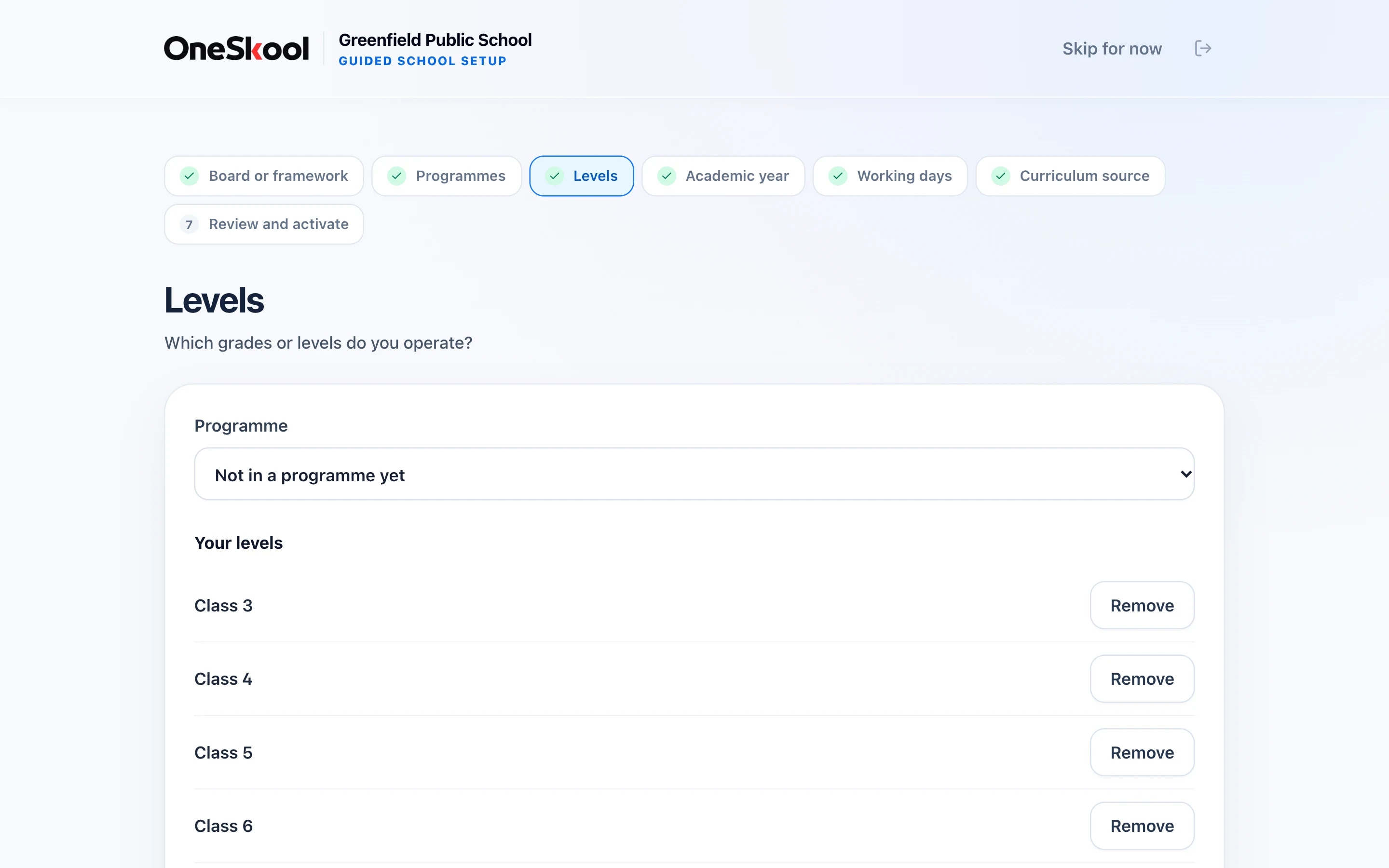
The principal is taken through the board, the programmes and grade levels you offer, the academic year and your working days. Each step saves as you go, and everything is reviewed before the school goes live.
- Board or framework
- Programmes and levels, Nursery to Class 12
- Academic year and teaching days
- A final review before activation
02Students & guardians
Every student, guardian and consent on one register.
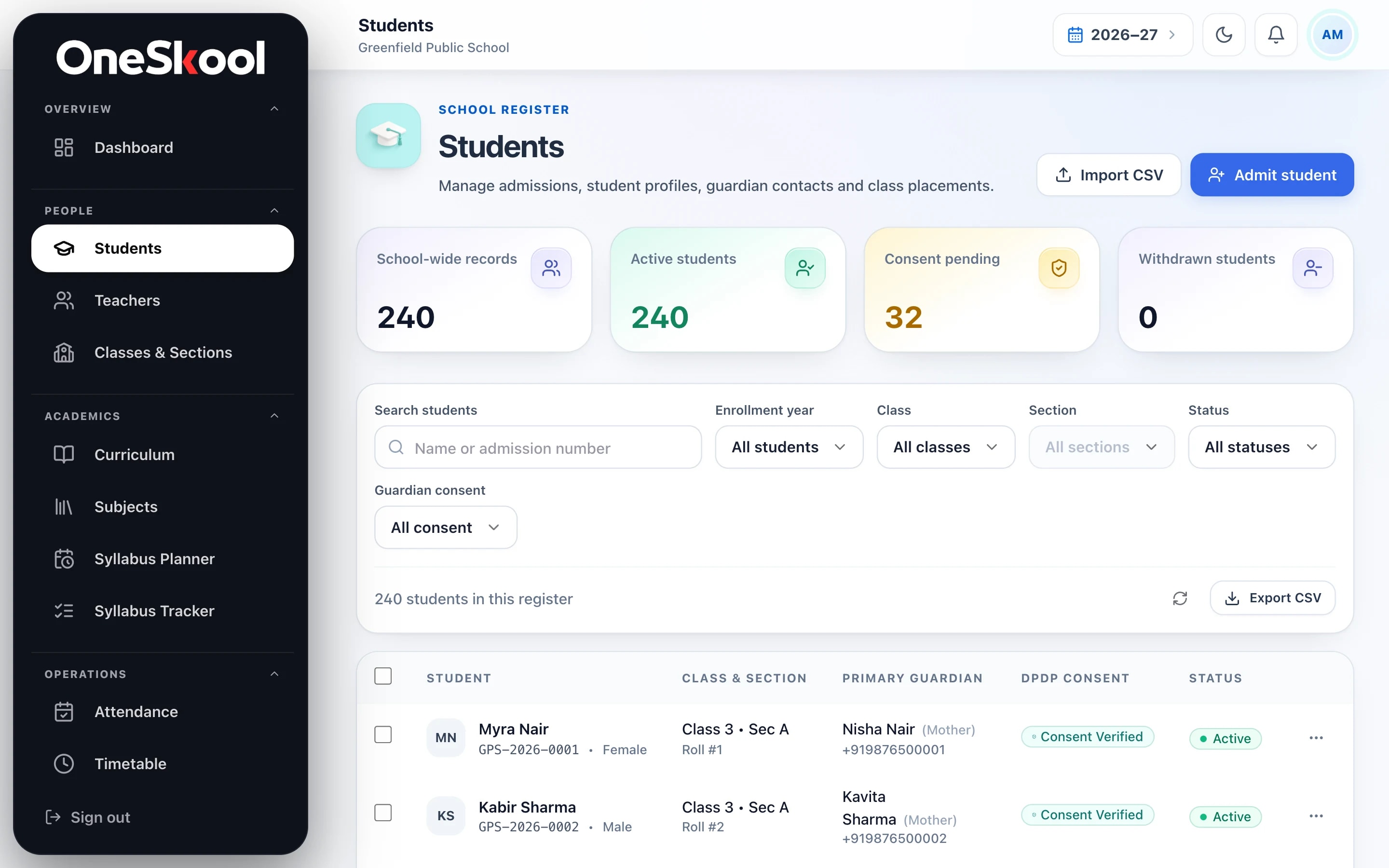
Admit students one by one or import a CSV — every row is checked before anything is saved. Each record carries the class and section, the guardians, and whether the family’s consent is recorded under India’s DPDP Act.
- Admissions by form or CSV import
- Guardians and contact details on each record
- Consent status you can filter by
- Transfers and withdrawals kept on the record
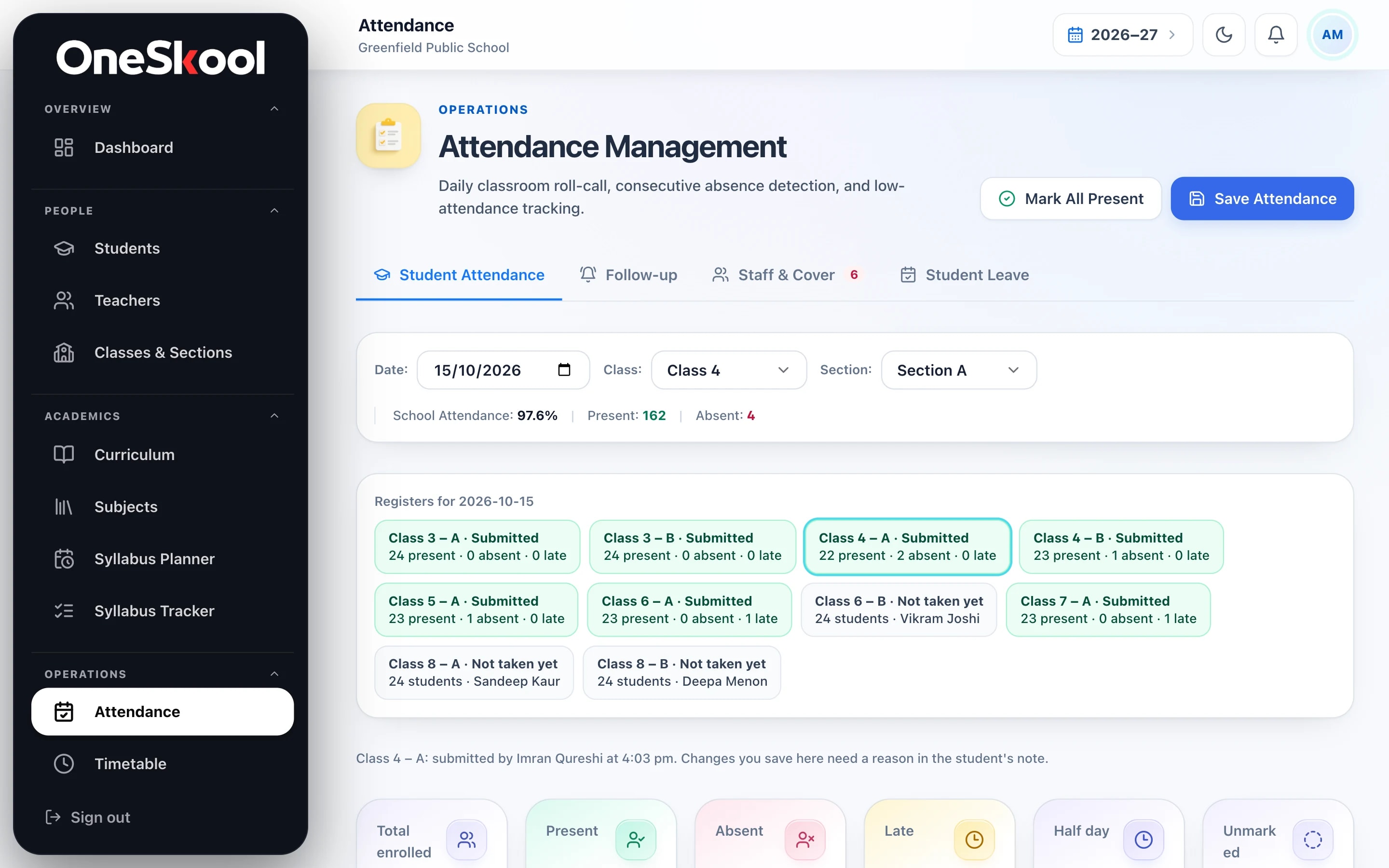
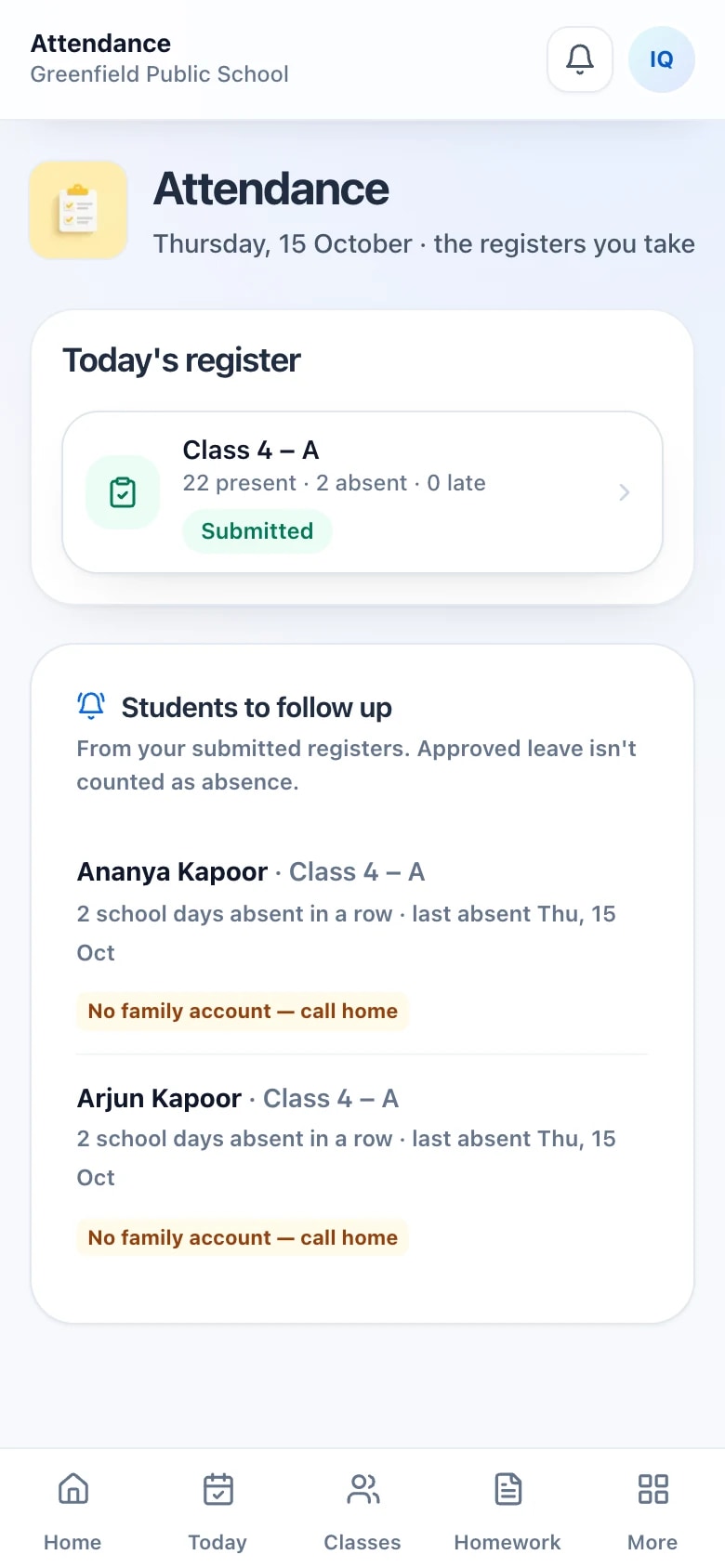
03Daily registers
Registers in minutes. Follow-up without a spreadsheet.
Class teachers take the register on their phones. The office sees which sections are done and which are still due, students absent several days running are flagged, and any change after submission keeps its reason.
- Register status for every section, today
- Present, absent, late, half day and excused
- Consecutive absences flagged for follow-up
- Corrections recorded with a reason
04Staff absence & cover
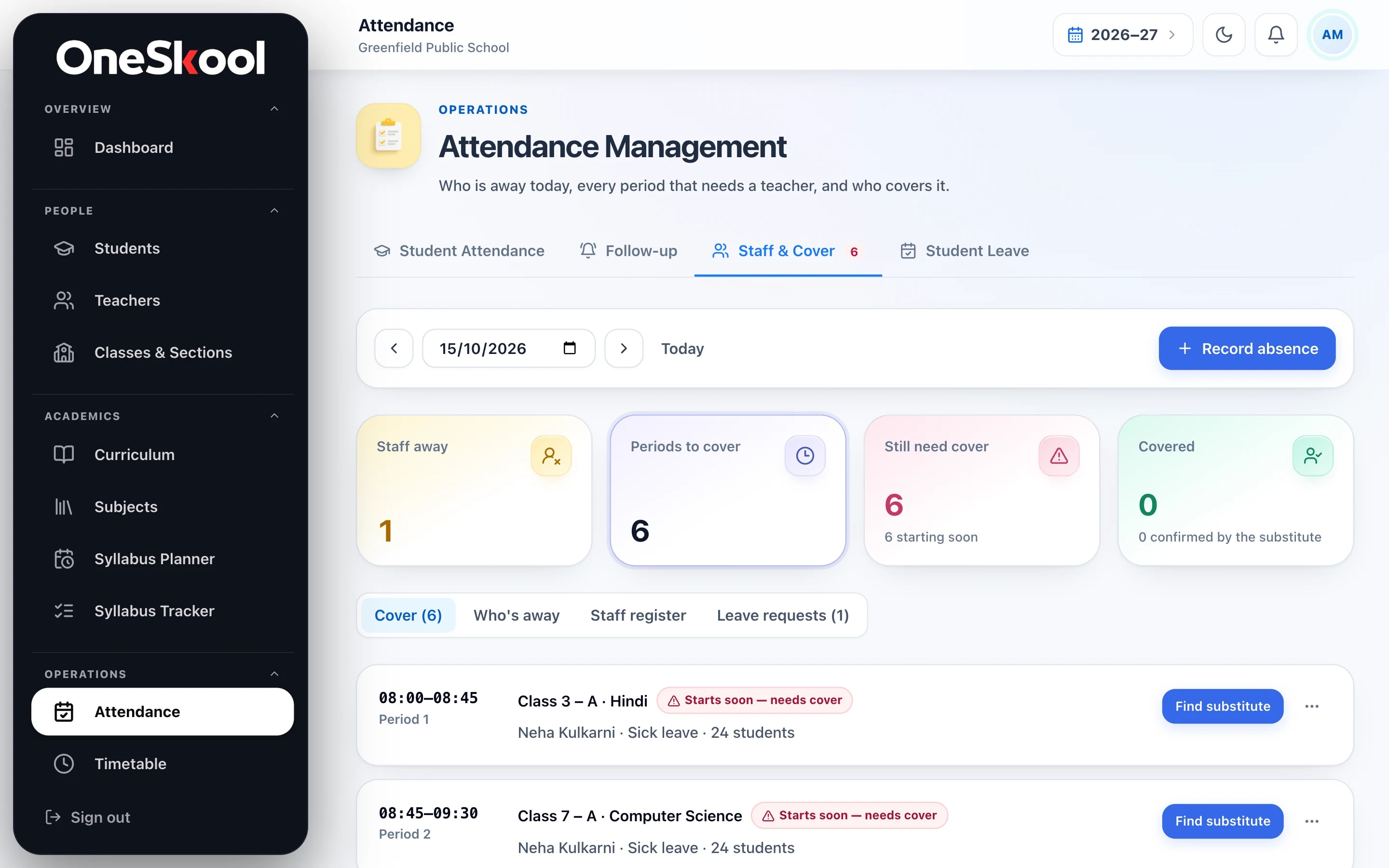
When a teacher is away, every period is accounted for.
Record an absence and OneSkool lists each period that now needs someone, the soonest first. Find a substitute for each, and keep leave requests and decisions in the same place.
- Periods to cover, as soon as an absence is recorded
- A substitute for each period
- Leave requests with approvals
- Who is away today, at a glance
05Timetable
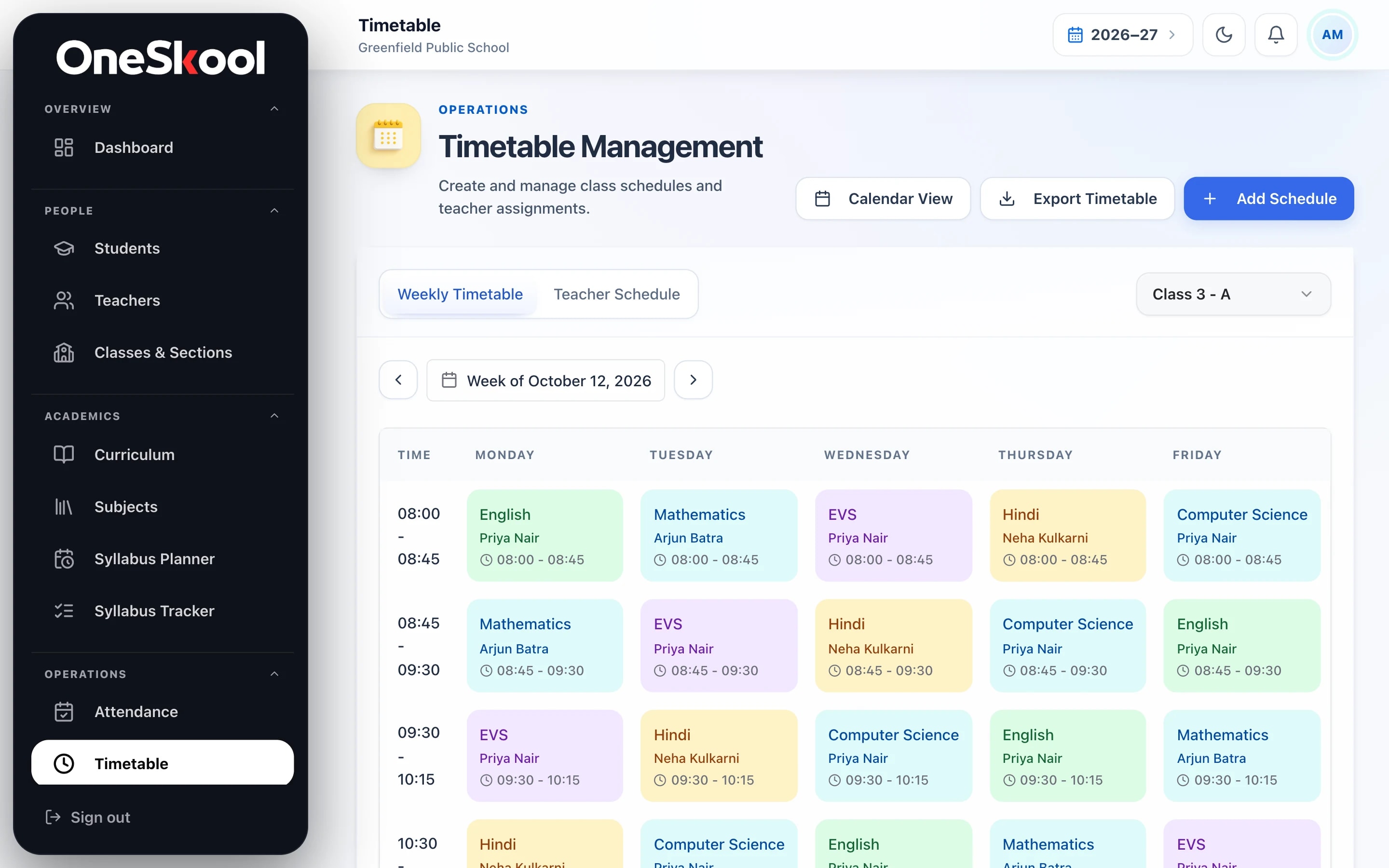
The week, period by period, for every section.
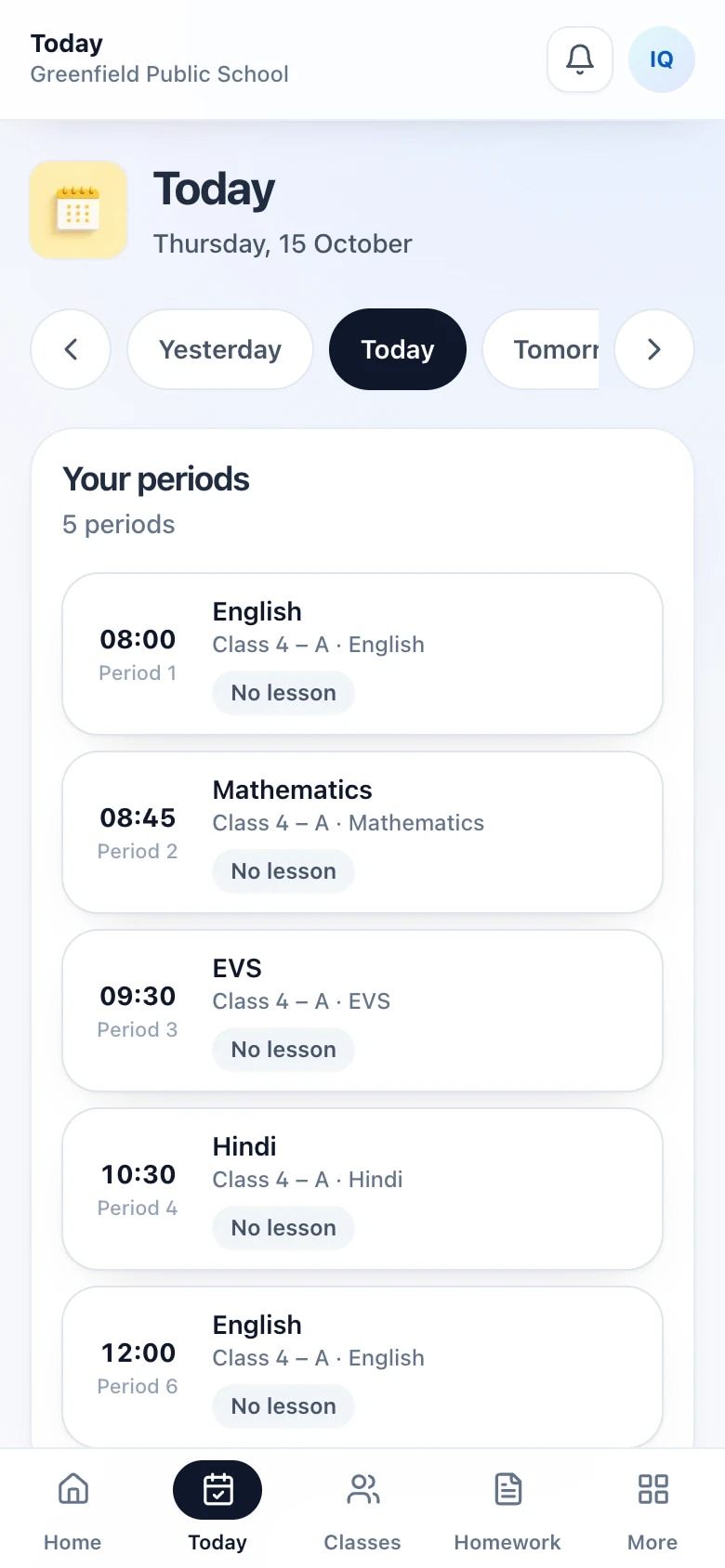
Build each section’s week with a subject and a teacher in every period, and see any teacher’s own schedule on its own tab. Teachers see their day’s periods on their phones.
- Subject and teacher in every period
- Each teacher’s schedule, side by side
- Removing a period keeps the teaching already recorded
- The day’s periods on the teacher’s phone
06Academic calendar
One calendar the whole school runs on.
Teaching days, holidays and terms live on a single academic calendar. Registers and lesson plans run on its teaching days — mark a holiday once and both follow it.
- Teaching days filled in from your working week
- Holidays and terms marked once
- Any single date changed later
- Registers and lesson plans follow it
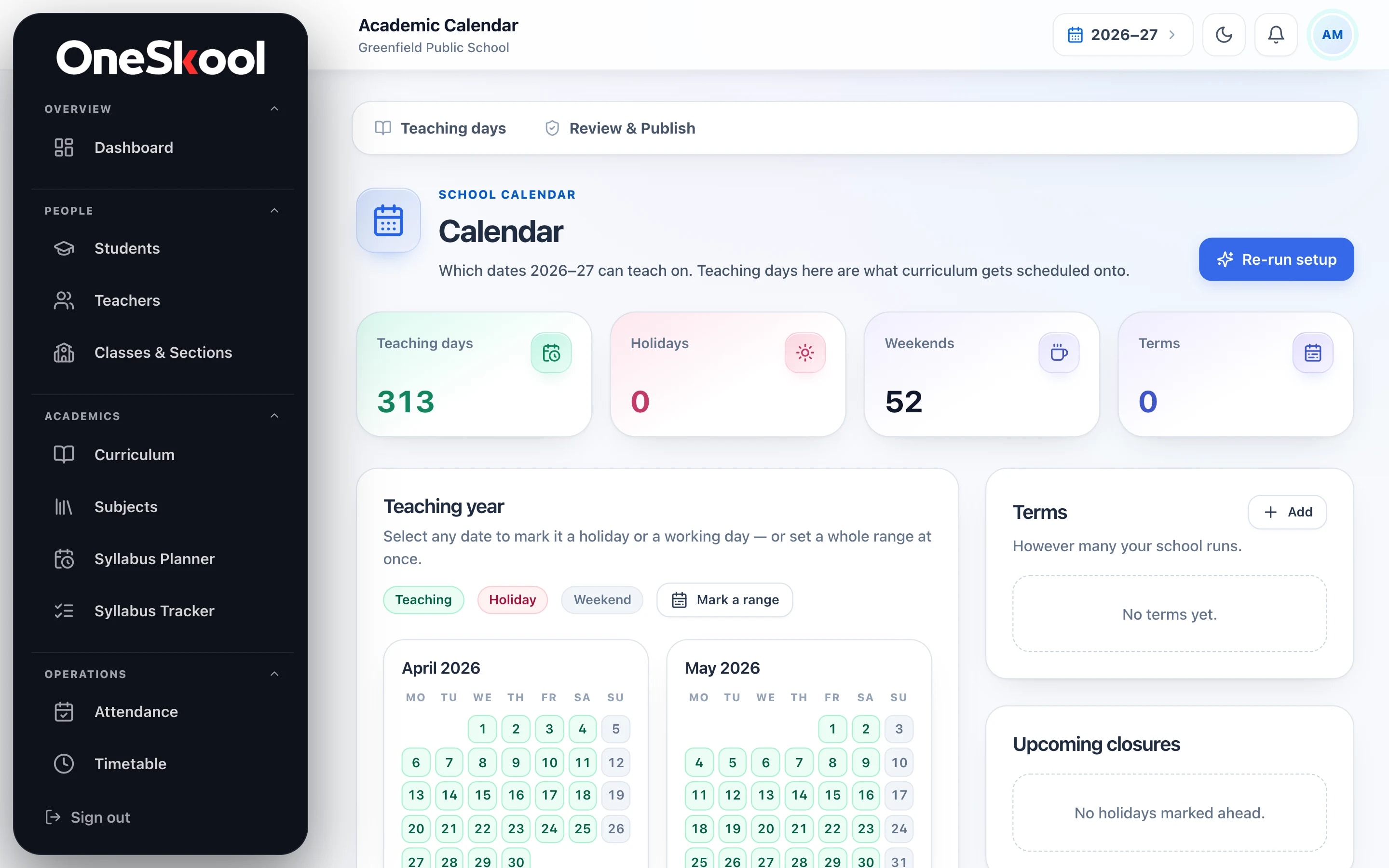
Real OneSkool screens, shown with a sample school’s data. Names and records are invented.
At a glance
Made for schools as they really are.
- Grade levels
Nursery → Class 12
Choose the programmes and levels your school actually runs.
- Workspaces
Five roles, one record
Principal, coordinators, teachers, parents and students each sign in to their own.
- To install
Nothing at all
Runs in the browser on phones, tablets and computers.
- Student imports
Every row checked
Upload a CSV and see what needs fixing before anything is saved.
One record
Every module reads the same record.
Admit a student once and they are on their section’s register — and, once the school has verified the family, in their parent’s portal. Mark a holiday once and registers and lesson plans follow it.
- School overviewWhat needs you this morning, on one screen
- Students & admissionsRecords, guardians, consent and CSV import
- Teachers & classesStaff, sections, subjects and who teaches what
- ReportsEnrolment, attendance and teacher summaries
- AttendanceDaily registers from teachers’ phones
- TimetablePeriods, sections and teachers, week by week
- Staff absence & coverEvery period that needs a substitute
- Academic calendarTeaching days, holidays and terms
- Curriculum & coverageWhat is planned, published and taught
- Announcements & eventsMessages and meetings for staff and families
- Family portalHomework, timetable and confirmed attendance

Privacy & trust
Built for the records schools are trusted with.
Children’s and families’ information is the most sensitive thing a school holds. OneSkool is designed around that.
Read our privacy policyEach school’s records stay its own
Every request is checked against the signed-in person’s school, so each school works only with its own records.
Access follows the role
Teachers see the classes they teach. A parent sees a child only after the school has verified the relationship.
Consent on the record
Guardian consent under the DPDP Act, 2023 is recorded for each student, and our Grievance Officer is published.
Changes leave a trail
Changes to people, classes and records are logged with who made them and when — and submitted registers keep every revision.
Leaving ends access
When a student is withdrawn, the family’s portal access ends at the close of the exit date. The school keeps the record.
Free School AuditFree
Where does your school leak time?
Answer guided questions about how your school runs today. Get a scored report, findings ranked by how much they matter, and a 90-day plan — with no login and no contact details.
- Academic management0–100
- Teacher management0–100
- Student monitoring0–100
- Operations0–100
- Families0–100
- Days 1–7
- 8–30
- 31–60
- 61–90
Getting started
From the first conversation to the first register.
- 1
A walkthrough on your school
We look at your classes, staff and calendar with you, and agree where to start.
- 2
Your school is created
Your principal receives a private invitation link and signs in with that email.
- 3
Guided setup
Board, programmes, grade levels, the academic year and working days.
- 4
People join
Teachers by invitation, students by form or CSV, families once the school has verified them.
- 5
The first register
Class teachers take attendance, and the school day starts running in OneSkool.
K–12 schools: the principal and office team, academic coordinators and teachers, and the parents and students the school serves. Each of them signs in to a workspace built for their part of the day.
Setup offers CBSE, CISCE, IB, Cambridge, JKBOSE, state boards and custom frameworks, with grade levels from Nursery to Class 12. You choose the programmes and levels your school actually runs.
The school invites each person by email. They sign in with that address and accept the invitation. A parent or student is linked to a student record only after the school has checked who they are.
Yes. Upload a CSV of students and OneSkool checks every row first, showing what needs fixing before anything is saved. You can also admit students one at a time.
Yes. OneSkool runs in the browser on phones, tablets and computers, and the teacher workspace has a layout made for phones. There is nothing to install.
Withdrawing a student ends the family’s portal access at the close of the exit date. The school keeps the student’s record.
We don’t publish school pricing. It depends on the size of your school and what you’ll use, and we share it after the walkthrough.
Request a walkthrough
Bring OneSkool to your school.
Tell us a little about your school. We’ll get in touch to arrange a walkthrough built around your own classes, staff and calendar.
- 1We read your request and write to you to find a time.
- 2We walk you through OneSkool using your school’s structure.
- 3If it fits, we set up your school and invite your principal.